
Workflow
Design to Test in ~30 Minutes


Prepare Your Project
Design your PCB, export Gerbers, open them in the PewCB app, and press Start.
Laser Processing
The laser selectively removes solder mask, copper and substrate, leaving behind traces and pads.
Stencil Fabrication
Attach the tin stencil sheet to the finished PCB, and the laser will cut the openings perfectly aligned with the pads.
Assembly & Soldering
Apply solder paste, place the components, reflow on a hot plate, then brush with IPA to clean off residue.
And its done!
Your prototype board is complete and ready for testing!
Build. Test. Revise. Repeat. All in a Single Day.
Precision for Modern PCBs
35 µm
Beam spot
30 µm
Repeatability
2 µm
Resolution
0.1 mm
Traces
0.1 mm
Spacing
This precision enables rapid prototyping of boards with modern SMD components: QFN packages 0.5 mm pitch and below, dense digital/RF sections, and 0402 passives.
Automatic Optical Calibration
Before every run, PewCB automatically calibrates its optical system. A patented photodetector-array technology ensures exact beam position across the entire work area, compensating for optical distortions.
Production-Quality Prototyping
Carefully selected blank materials deliver precise board features comparable to factory-made PCBs. Combined with our custom stencil process, this ensures accurate solder deposition and clean joints without bridging.
Blanks
Double-Sided PCB Prototyping: Without hazardous chemicals
PewCB uses two-sided PCB blanks with an integrated via grid and rows of plated through-holes along the edges. This solves one of the biggest challenges in desktop fabrication: creating reliable interlayer connections. PCB blanks range from 23 × 23 mm to 84 × 84 mm.
Use the provided blank templates in your EDA, route traces to the nearest available via to switch layers, and place through-hole parts in available PTHs—completely skipping drilling, chemical processing, or electroplating.
Use the provided blank templates in your EDA, route traces to the nearest available via to switch layers, and place through-hole parts in available PTHs—completely skipping drilling, chemical processing, or electroplating.


Via Grid
A built-in grid of plated vias that connect the top and bottom layers without extra steps such as drilling or electroplating.
Solder Mask
The blanks have pre-applied solder mask, which helps control solder flow and reduces the risk of solder bridges during assembly. Mask colors match eCAD conventions: red for the top side and blue for the bottom.
Copper
Ceramic Substrate
The ceramic base withstands both laser processing and soldering temperatures while providing excellent heat distribution during hot plate or oven reflow.
Peripheral PHT Rows
Dual rows of mounting holes with standard 2.54mm pitch allow you to mount common connectors and through-hole components, or used as additional interlayer vias.
Customizability
Custom blanks with project-specific dimensions, geometry, and hole patterns can be developed upon request.
Ready-to-Use eCAD Templates
Templates for every blank size let engineers start designing immediately and take full advantage of the built-in blank capabilities. They exist for most EDA tools. If yours is missing, we will build a template for your software upon request.
Malleable Stencils
A new approach to prototype assembly: once the PCB is fabricated, attach a single-use stencil sheet to the board and place it back on the tray platform. The laser automatically cuts the stencil openings according to the Gerber Paste layer. Once the solder paste is applied, the stencil is discarded.
This approach makes paste application fast and precise — accelerating PCB assembly.
Perfect Pad Alignment
The stencil keeps firmly attached to the board during and after processing. This ensures precise pad alignment without manual fiducial matching, or additional fixturing mechanisms.
Fast Paste Application
The stencil remains securely attached to the PCB during solder paste application. This allows engineers to apply paste quickly and cleanly without a stencil frame, clamps, or external alignment jig.
Tin Plating of Pads
As the stencil openings are cut, a thin protective tin layer is deposited onto the copper pads, improving solderability during assembly.
Desktop PCB Lab
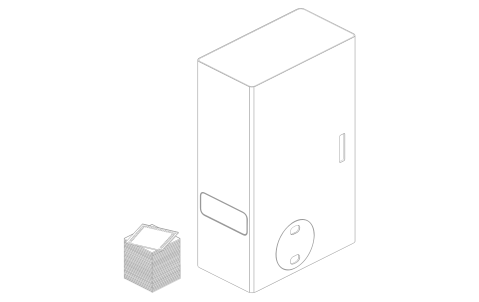
PewCB is a clean, quiet, and compact system that fits seamlessly into any workspace. It requires no separate lab room, fume hood, or specialized environment— the device is ready to operate right on your desk.
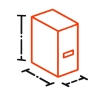
Truly Desktop-Sized
The system measures just 155 × 290 × 464 mm and weighs 11 kg.
It takes up no more space than a standard desktop PC and runs from a regular wall outlet.
It takes up no more space than a standard desktop PC and runs from a regular wall outlet.
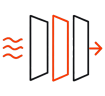
Clean and Safe Operation
A fully enclosed all-metal chassis keeps byproducts contained inside the machine. A three-stage filtration system—featuring G4 pre-filtration, F7 fine filtration, and activated carbon—removes fumes and dust, preventing odors from spreading. The software automatically tracks filter life and alerts you when it is time for a replacement.

Safety-First Design
The device complies with Class 1 laser safety standards. The fully enclosed work chamber keeps laser radiation contained inside, while built-in sensors prevent the tray from closing if obstructed. The laser activates only when the tray is fully closed, and the internal camera provides real-time video monitoring.

Functional Prototyping
Move Fast and Break Things
Instead of developing conservatively and falling into analysis paralysis by spending hours to check and recheck every design decision before a week-long factory fabrication cycle, R&D teams can do bold experiments, test ideas the moment they emerge, let things break and learn fast from that. With PewCB, the low cost of mistakes makes it possible.
Risk Isolation & Modular Validation
Sometimes the smallest design mistake in an auxiliary circuit can turn the whole device prototype into e-waste. Engineers can avoid costly iterations by using PewCB to build and validate various subsystems (such as voltage converters, sensors, or motor controllers) on separate, fast-to-fabricate boards. Once the submodule is tested and approved, it can be safely integrated into the final product design.
05
Integrate
Safely merge into the final product
04
Test
Validate immediately in real hardware
03
Fabricate
Produce your PCB instantly with PewCB
02
Design
Create the schematic and PCB layout
01
Concept
Start with an idea or subsystem
New tool in your mental toolbox
Just as 3D printers became invaluable for mechanical prototyping, PewCB unlocks solutions to a broad range of daily R&D tasks. Look inside our developers' drawers, and you will find countless adapter boards, breakout boards, one-off test jigs, measurement helpers, and interface converters. Each of these is now just 30 minutes away. It is truly an engineering superpower.
Education
From Idea to Hardware in a Single Lab Session
PewCB was built not only for industry, but also for engineering education. Too often, students face long lead times and a massive gap between an idea and a working device. As a result, they learn electronics design in the abstract—simulating circuits and submitting reports, but rarely experiencing the full hardware development cycle firsthand.
PewCB changes that. Students can design a PCB, fabricate a prototype, assemble, program, and test it—all within a single lab session.
PewCB changes that. Students can design a PCB, fabricate a prototype, assemble, program, and test it—all within a single lab session.

Engineering Thinking
PewCB fosters critical problem-solving skills by making mistakes risk-free. Students immediately see the real-world consequences of their choices. Power integrity issues, routing errors, and firmware bugs stop being abstract concepts and become valuable, tangible engineering experience.
Full-Cycle Lab Work
EDA ➔ PCB ➔ Assembly ➔ Firmware ➔ Testing.
Instead of stopping at simulation, students leave the lab with a functioning hardware prototype in their hands, completing the entire cycle before the bell rings.
Instead of stopping at simulation, students leave the lab with a functioning hardware prototype in their hands, completing the entire cycle before the bell rings.

Classroom Safe
PewCB operates safely in classrooms, university labs, and teaching environments. This is made possible by our fully enclosed architecture and integrated filtration system.
Specifications
Laser wavelength
1064 nm
Average optical power
20 W
Laser pulse duration
~100 ns
Laser spot diameter
35 μm
Supported blank materials
Copper-clad alumina ceramics, zirconia ceramic
Min. blank size
23 x 23 mm
Max. blank size
84 x 84 mm
PC connection
USB Type-B
PewCB software
Free (Windows/Linux)
Power consumption
200 W
Power supply
AC 110-230 V
Dimensions
155×290×464 mm
Weight
11 kg
Limitations
PewCB is designed for rapid engineering validation and functional prototyping. Like any manufacturing process, it comes with a specific set of tradeoffs and design considerations. In practice, these are easy to work with once they are understood and accounted for during design and assembly.

Exposed Trace Areas Near Pads
PewCB blanks come with a solder mask already in place. During laser processing, copper is removed to form the PCB topology, and some solder mask is also removed in those areas, leaving the side edges of the copper traces exposed.
In most cases, this does not affect board functionality. However, in dense areas — such as around fine-pitch ICs or connectors — excessive solder paste may spread onto exposed trace sections and create solder bridges.
Recommendation: use the PewCB stencil system to apply solder paste in a precise, controlled layer directly onto the pads, If necessary, critical areas can be additionally protected with a UV-curable solder mask pen(supplied separately)
In most cases, this does not affect board functionality. However, in dense areas — such as around fine-pitch ICs or connectors — excessive solder paste may spread onto exposed trace sections and create solder bridges.
Recommendation: use the PewCB stencil system to apply solder paste in a precise, controlled layer directly onto the pads, If necessary, critical areas can be additionally protected with a UV-curable solder mask pen(supplied separately)
Brittleness of the substrate
The ceramic substrate is hard, stiff, and highly heat-resistant. It is not fragile during normal handling and is unlikely to break simply from being held, assembled, or moved carefully. However, like other ceramics, it can crack or break from hard impacts, for example when dropped on a tile floor.
Recommendation: Handle with care. In case of breakage, avoid contact with sharp edges.
Recommendation: Handle with care. In case of breakage, avoid contact with sharp edges.
Thermal conductivity of the substrate
The ceramic substrate has high thermal conductivity, which can make large components difficult to solder using a soldering iron alone: the board just sucks heat away from the pad, not allowing solder to reach melting point.
Recommendation: use hot air, bottom-side preheating, or a reflow oven. Ceramic-based boards handle thermal cycling well, and the traces remain stable without delamination from overheating, while high thermal conductivity becomes actually advantageous. Another solution is to use special blanks made of zirconia ceramic, which has much lower thermal conductivity, similar to FR4.
Recommendation: use hot air, bottom-side preheating, or a reflow oven. Ceramic-based boards handle thermal cycling well, and the traces remain stable without delamination from overheating, while high thermal conductivity becomes actually advantageous. Another solution is to use special blanks made of zirconia ceramic, which has much lower thermal conductivity, similar to FR4.
Reduced Flexibility in Via Placement
PewCB blanks already contain an integrated grid of metallized vias. This significantly accelerates prototyping and enables double-sided PCBs without chemical processing or electroplating.
The tradeoff is that via locations are predefined, so they cannot be placed completely arbitrarily the way they can in conventional PCB manufacturing.
Recommended workflow: when routing the PCB, treat the via grid as part of the blank architecture and connect traces to the nearest available vias. If a via is required in a non-standard location, an additional through-hole can be laser-drilled and manually fitted with a rivet (supplied separately). The prepared perimeter hole rows can also be used as additional interconnect points.
The tradeoff is that via locations are predefined, so they cannot be placed completely arbitrarily the way they can in conventional PCB manufacturing.
Recommended workflow: when routing the PCB, treat the via grid as part of the blank architecture and connect traces to the nearest available vias. If a via is required in a non-standard location, an additional through-hole can be laser-drilled and manually fitted with a rivet (supplied separately). The prepared perimeter hole rows can also be used as additional interconnect points.
Early Bird
Terms
Estimated delivery time: ~90 days
A 30% deposit is required to reserve the device
What’s Included
PewCB One system
Blanks Starter Set - 20 pcs.
$5000 USD
Shipping costs, import duties, and regional taxes are not included.
Team
Who we are
15 years
100 devices
The team members have extensive experience in electronics development and have been working together in hardware startups for over 15 years (Antilatency, Illumetry) where over 100 end-user devices have been developed and 15 000+ devices shipped worldwide.


Through years of building real electronic products, the team repeatedly faced the same limitation: PCB prototyping was constrained by external manufacturing cycles. We tried different approaches to in-house prototyping — including toner transfer, PCB CNC milling, and standard laser engraving — but none of them provided the speed, precision, and workflow integration required for continuous hardware development.
PewCB was not created as a concept
It began as an internal engineering tool built to solve real prototyping bottlenecks the team had encountered during years of hardware development.


Discuss prototyping workflows, share projects, follow development updates, and talk directly with the team.

© 2026 Exostartup. All rights reserved.
Personal data processing policy
Personal data processing policy


